
This simple API makes dynamic data easily available to a developer for use in custom HTML code. It returns all the dynamic data available to an ad impression so that the developer can extract out relevant elements to design the ad creative. The returned response is an Array. It allows getting multiple values from an asset database. Consider the example of a site that can drop cookies with multiple values (colon separated) when users view different products. This provides data from all the assets with asset keys matching colon-separated values in the cookie.
Example Usage: The sample code shown below will print out to console all the dynamic data available to that ad impression:
function initiate() { var dyData=jvxAd.getDynamicData(); __ Code to use dyData console.log(dyData); }Response: In the example output below, the selected row from an Asset Source named NumbersTest is returned by the system:
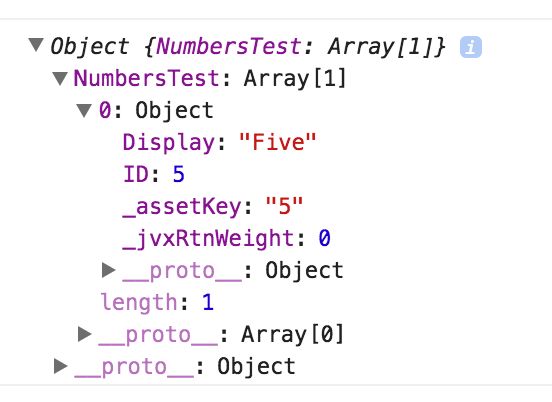
To access the selected row, use.
var dynRow = dyData.NumbersTest[0];To access the column named 'Display' from the selected row, use:
var dynRow = dyData.NumbersTest[0];var dynCol = dynRow.Display;In the example below, both the selected row from the asset source NumbersTest, and a Jivox Data signal configured through the Advanced tab are returned in the response:
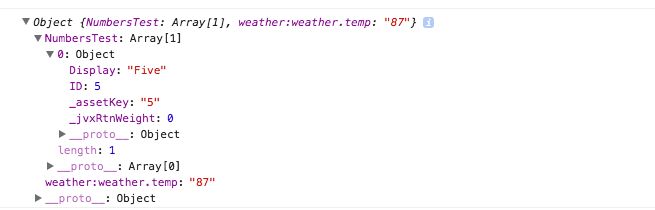
If the campaign has enabled Jivox data triggers to be made available to the widget, you can also access these. For e.g. to access the data signal value of Temperature, use:
var temperature = dyData["weather:weather.temp"];